
23 Minutes of Downtime.
Not a Minute of It in Any Report.
The operator presses a button and the call reaches the person who has to answer it, on a watch or a phone. A machine can raise it on its own. Every wait is timed and lands in your reports.
Free for 60 days for first-time customers at US plants · the hardware ships and goes back free · starts with a 30-minute call





Other problems we hear every week
🚶 Operators leave the station to find help 40+ min a shift
"Our operators leave their stations for 10+ minutes just to find a supervisor, lead, or maintenance person. That happens multiple times per shift."
— Modular Manufacturing Facility, Florida
If that happens four times a shift:
= 40+ minutes a shift gone at that one station
= and every minute of it invisible to your reports
📻 The call gets made and nobody hears it Daily misses
"It's a loud facility. Radios aren't heard well. Intercom calls aren't audible. We've tried everything."
— Foam Manufacturing, 60K sq ft, Pennsylvania
And where it’s quiet enough to hear, the call still has to reach that far:
"I didn't hear it. I was in the back near the compressors. The radio doesn't reach back there." — Maintenance Tech
The call was made. Nothing delivered it, and nothing recorded that it went unanswered.
🔔 Calls sit unanswered until somebody notices 25 min waiting
"The call was made 25 minutes ago. No one responded. The operator just sat there waiting."
— Tier-1 Automotive, Michigan
Without escalation:
• First responder is busy → call dies
• No backup gets notified
• Nobody else gets the call
• No one knows it's still waiting
📊 No proof of any of it when management asks Invisible losses
"I know we're losing time, but I can't prove it. When leadership asks how much downtime costs us, I have nothing to show them."
— Operations Manager, Midwest Manufacturing
"With radios there's no record keeping. It's all he said, she said." — Manufacturing Facility, Mississippi
• Can't prove which stations need the most help
• Can't show leadership what slow response actually costs
• Can't defend your team when something goes wrong
• Can't feed your CI reviews with real numbers
The waiting that costs you every shift is invisible today
* Source: MMCall 60-day free trials at North American manufacturing facilities, 2025 to 2026.
Now put your own numbers in
Five days a week, year round. That's time you're already losing, not a savings promise. And nothing on your floor is timing these calls today.
Everything above is still an estimate. Run the free 60-day trial in your plant and you get the real number instead: every call timed, your own hours, station by station and shift by shift.
Your whole plant on one board
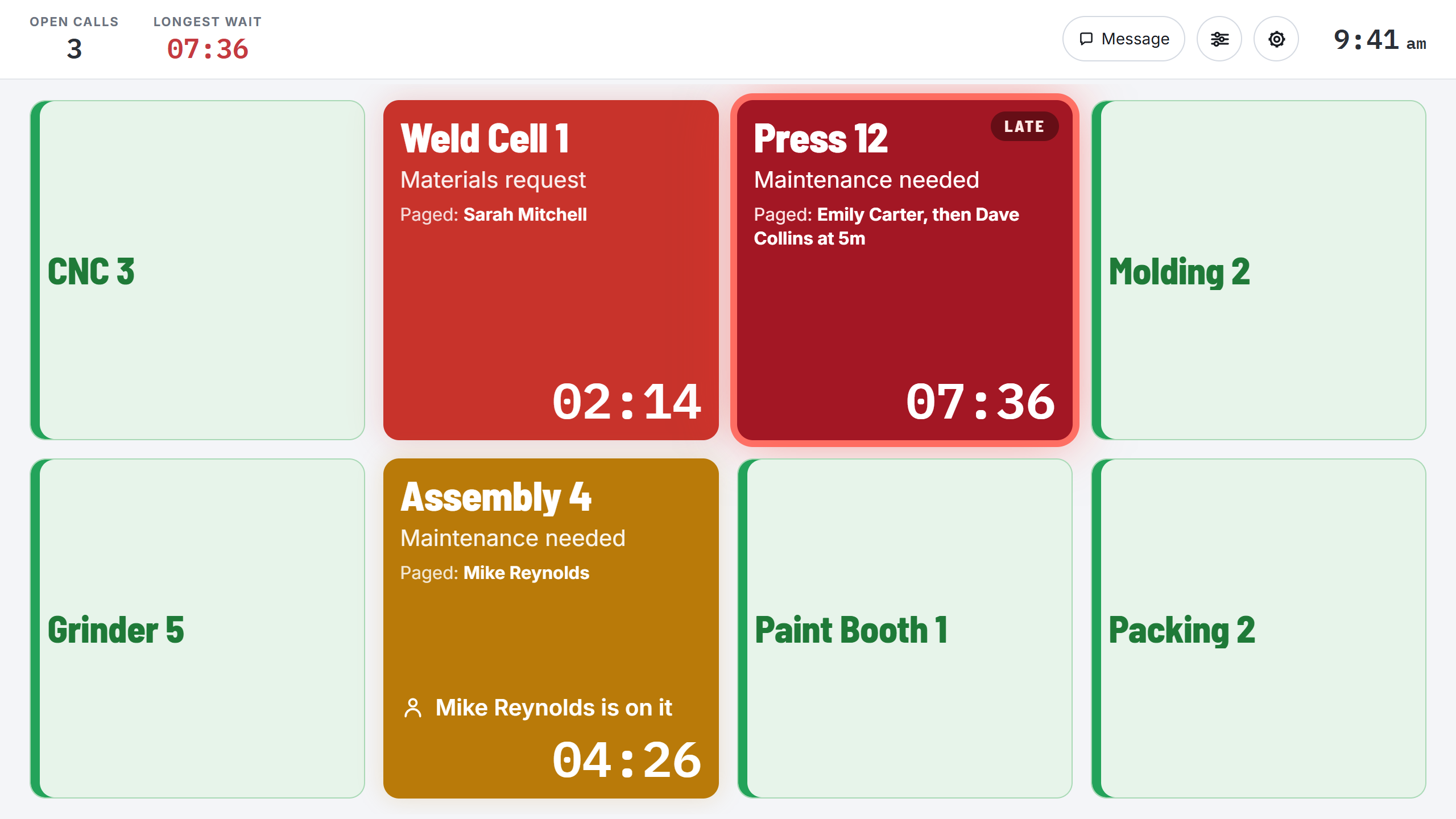
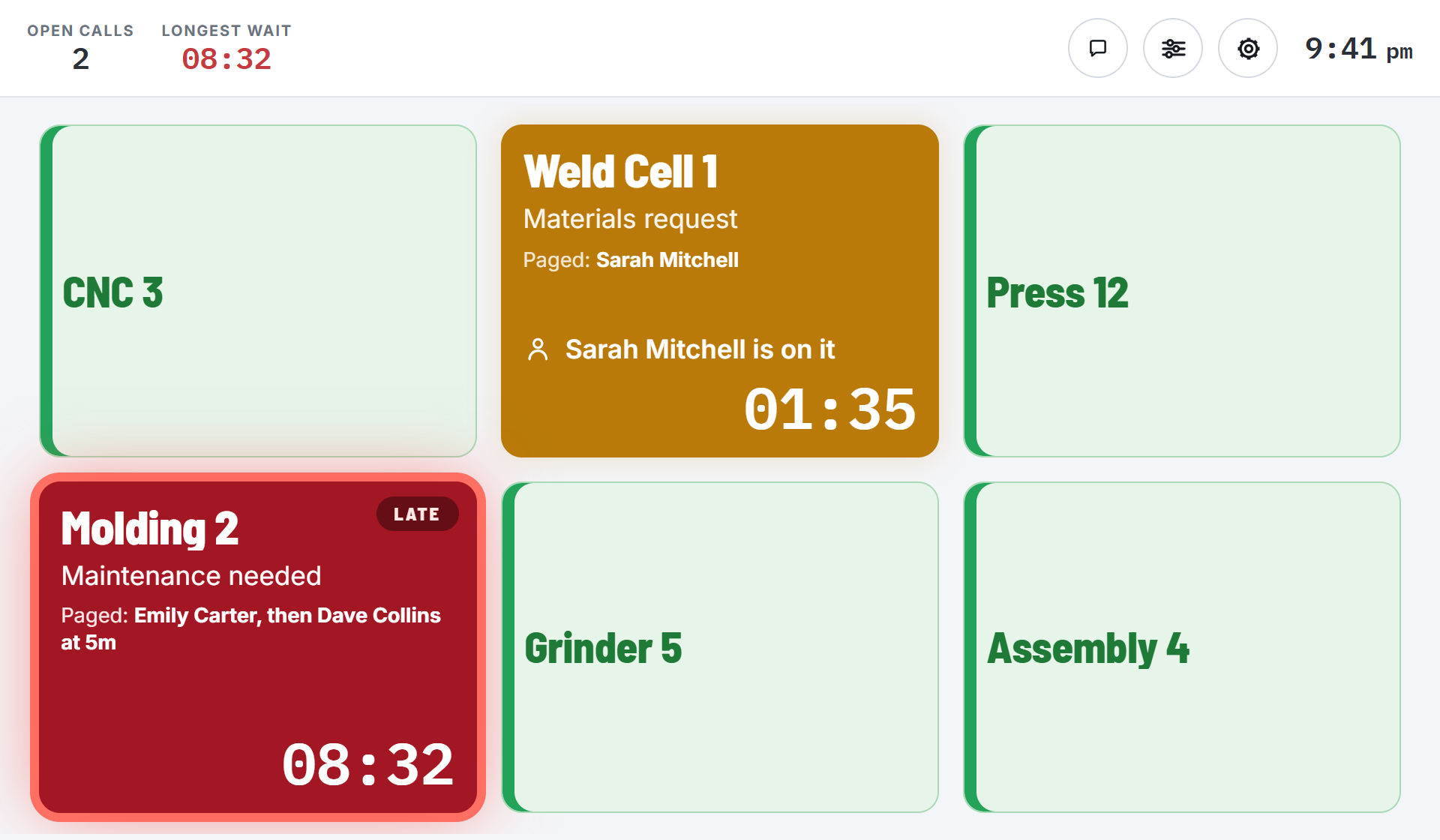
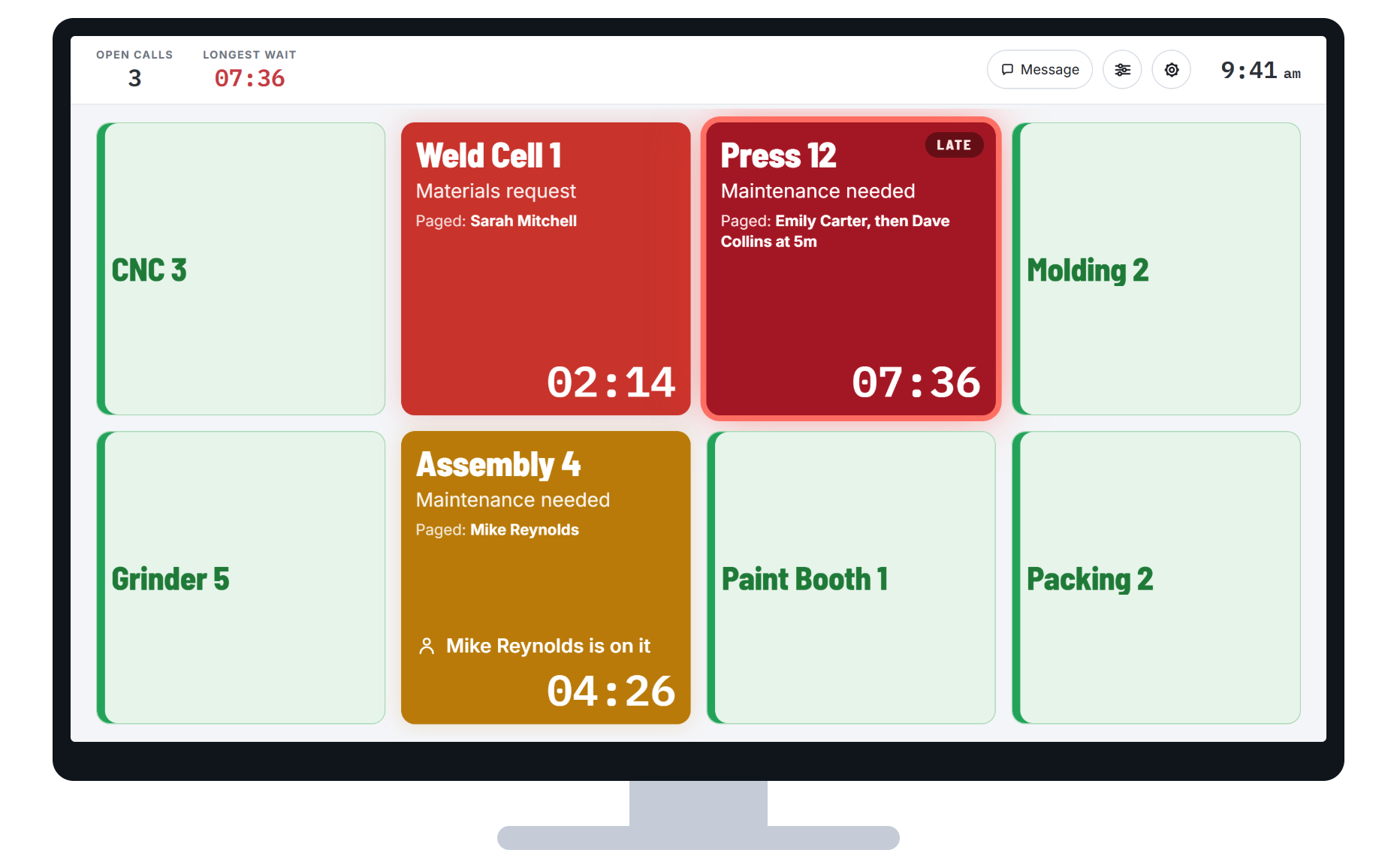
Every station on one board, under the names your plant already uses, with a clock running on every open call. Each tile tells you who is waiting, for how long, and whether somebody is already on it.
 1
2
3
4
1
2
3
4
The board runs in a browser, so the same board opens on as many screens as you want, all in sync: a TV on the floor, the supervisor’s laptop, the phone in his pocket. Any TV, monitor or PC you already own will do.
Someone presses a button
A call button sticks to the station, no wiring and no drilling. One key per team, labeled in your plant’s own words, so the call says who is needed before anyone walks over.
The machine calls on its own
A module wires to a contact your machine already has for running, stopped or fault, and turns it into a call. No PLC programming. Who that signal pages is set in the software.
A system you already run
Your MES, SCADA or CMMS can raise the call too. If it can flag it, the right person gets paged.
The calls reach whoever needs them, wherever they are
The board stays on the floor. The call goes to the person who has to answer it, on a watch pager or the phone in his pocket.
The call lands on the lock screen
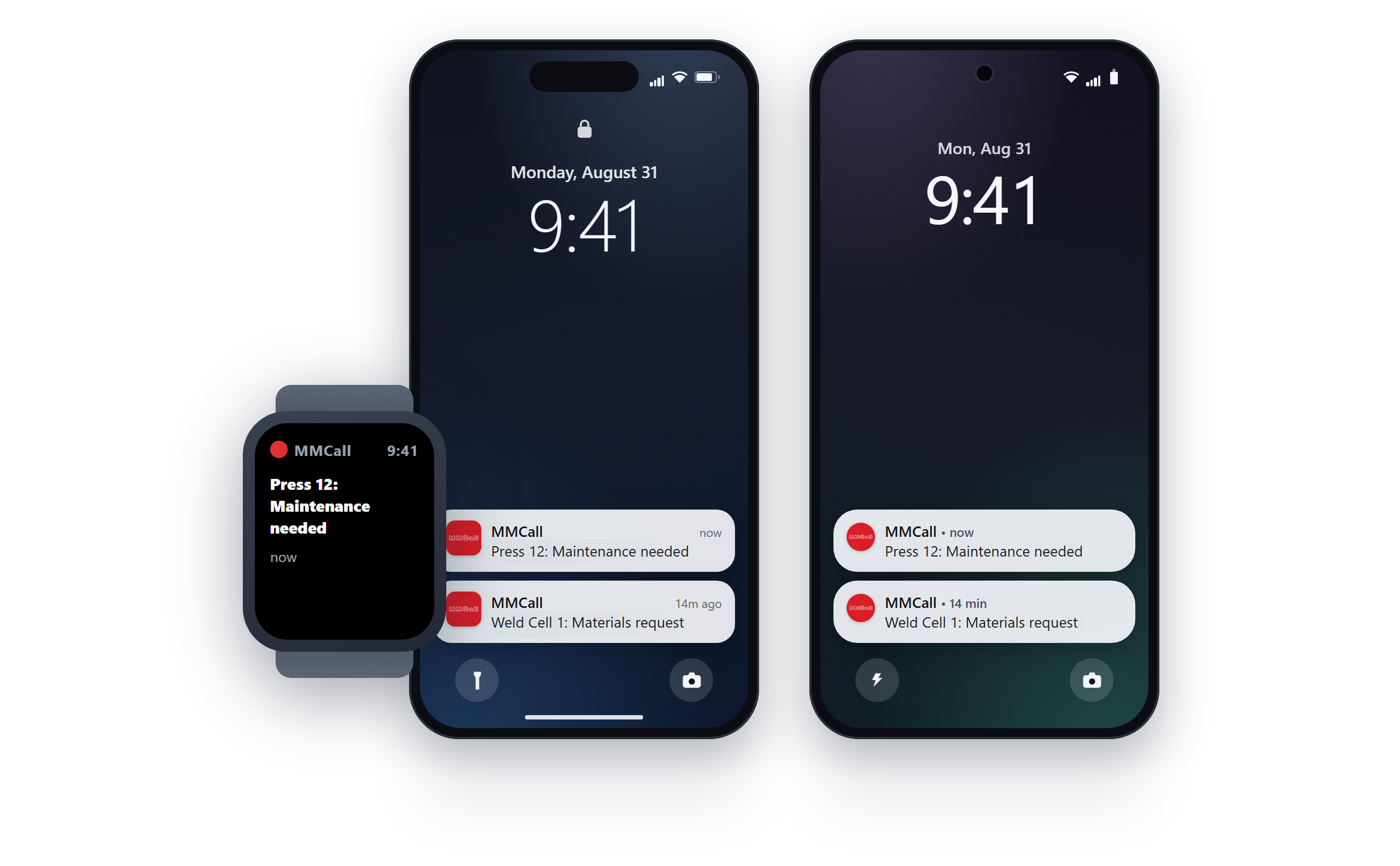
The supervisor in a meeting and the maintenance lead in the crib get the call the way a text arrives, with the station and what it needs right on the lock screen. If he wears a smartwatch, an Apple Watch or an Android one, it reaches his wrist too. On a floor where phones aren’t allowed, the watch pagers and the lights still carry every call.
- Each call goes to the team it’s for, and only the people on shift are paged.
- Nothing to download and no app store.
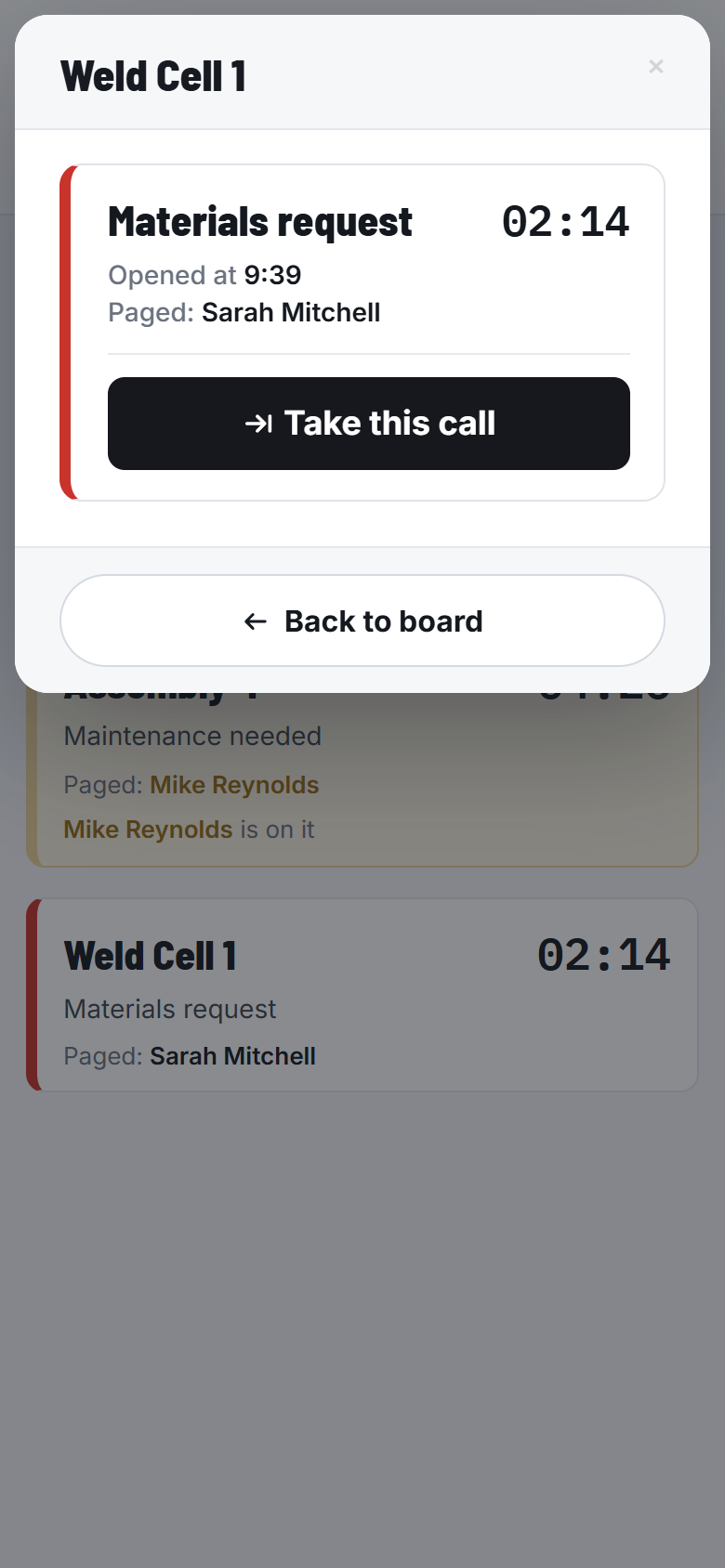
The Floor Board on a phone, and Weld Cell 1 one tap later
Tap Take and the whole plant knows who has it
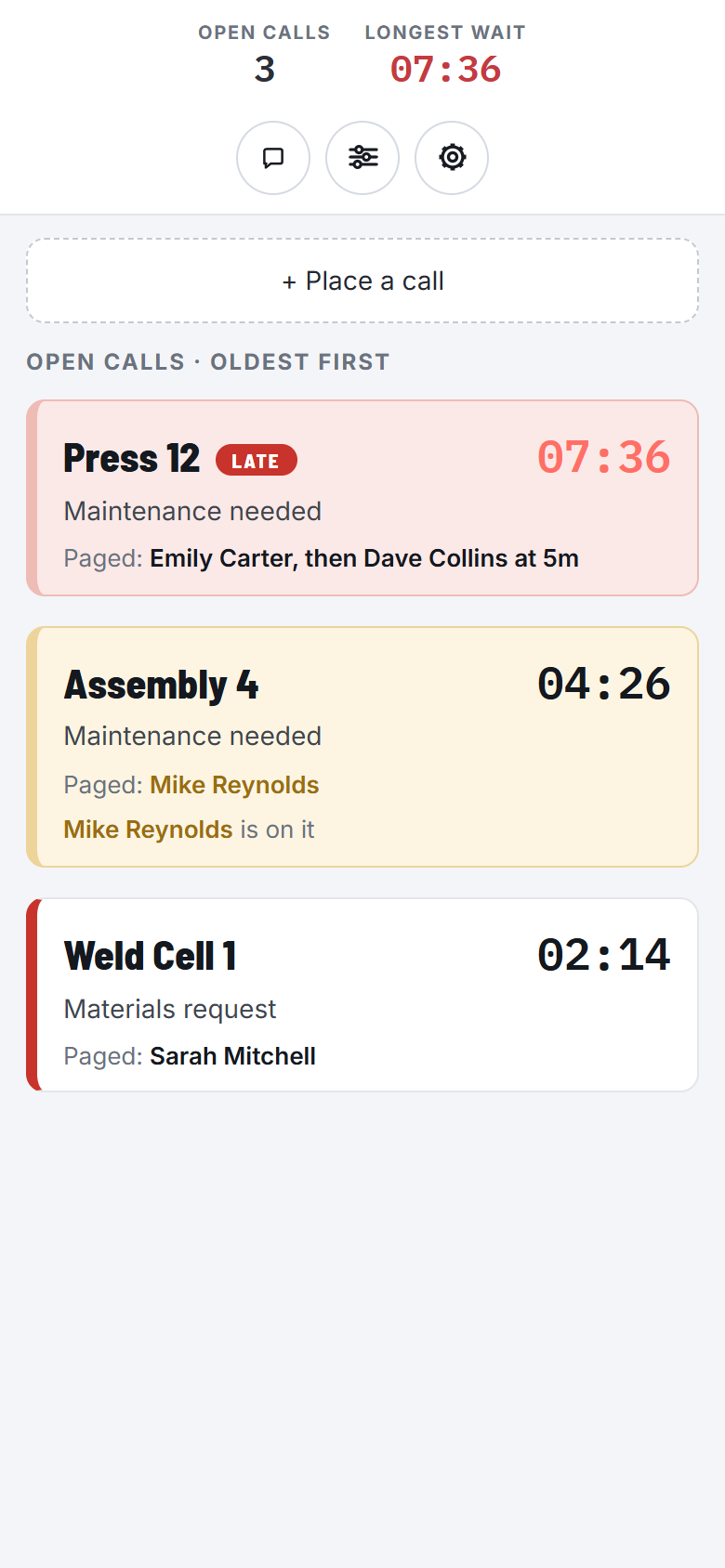
Open the alert and the Floor Board is there: every open call with its clock, who was paged, and who’s already on it. Tap Take and his name goes on the call on every screen and every phone. Two people don’t walk to the same station, and nobody assumes somebody else has it.
- A call nobody takes escalates to the next person on its own.
- On a floor with no phones, whoever answers presses the Assistance button when they get there, and the tile turns amber on every screen.
See the floor from your desk
Sign in from the office, another building or another plant, and the Floor Board opens live, the same board the floor is looking at. Monitoring and the reports are one click away, and a company with several plants sees all of them on one board.
Send a message to anyone, from wherever you are
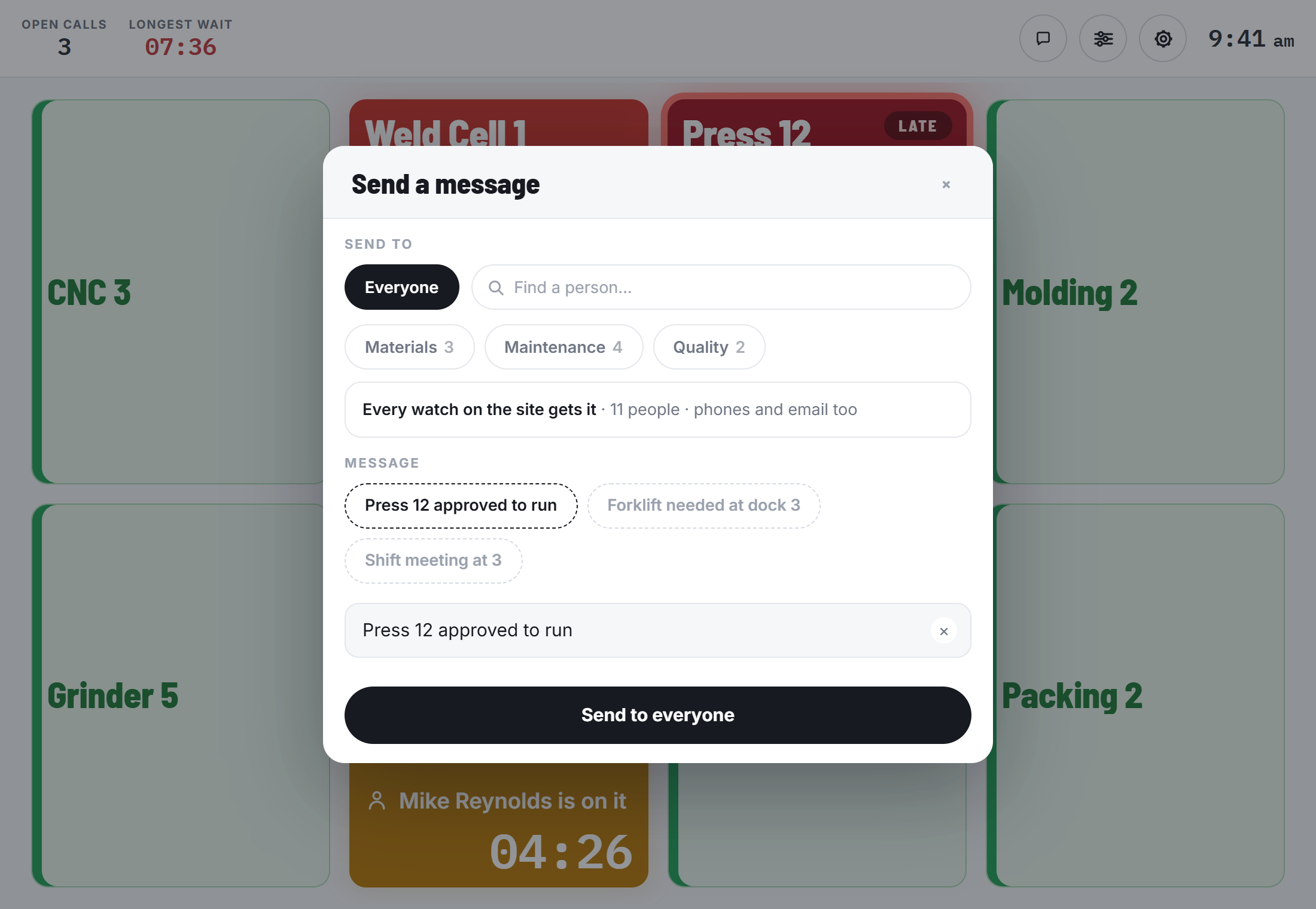
Tap Message on the board, pick everyone, a team or one person, and type it or tap a preset: “Press 12 approved to run”, “Shift meeting at 3”. It reaches their watch or phone the same way a call does, from the plant PC, your phone or a computer at home.
Your machines and your MES can raise the same call
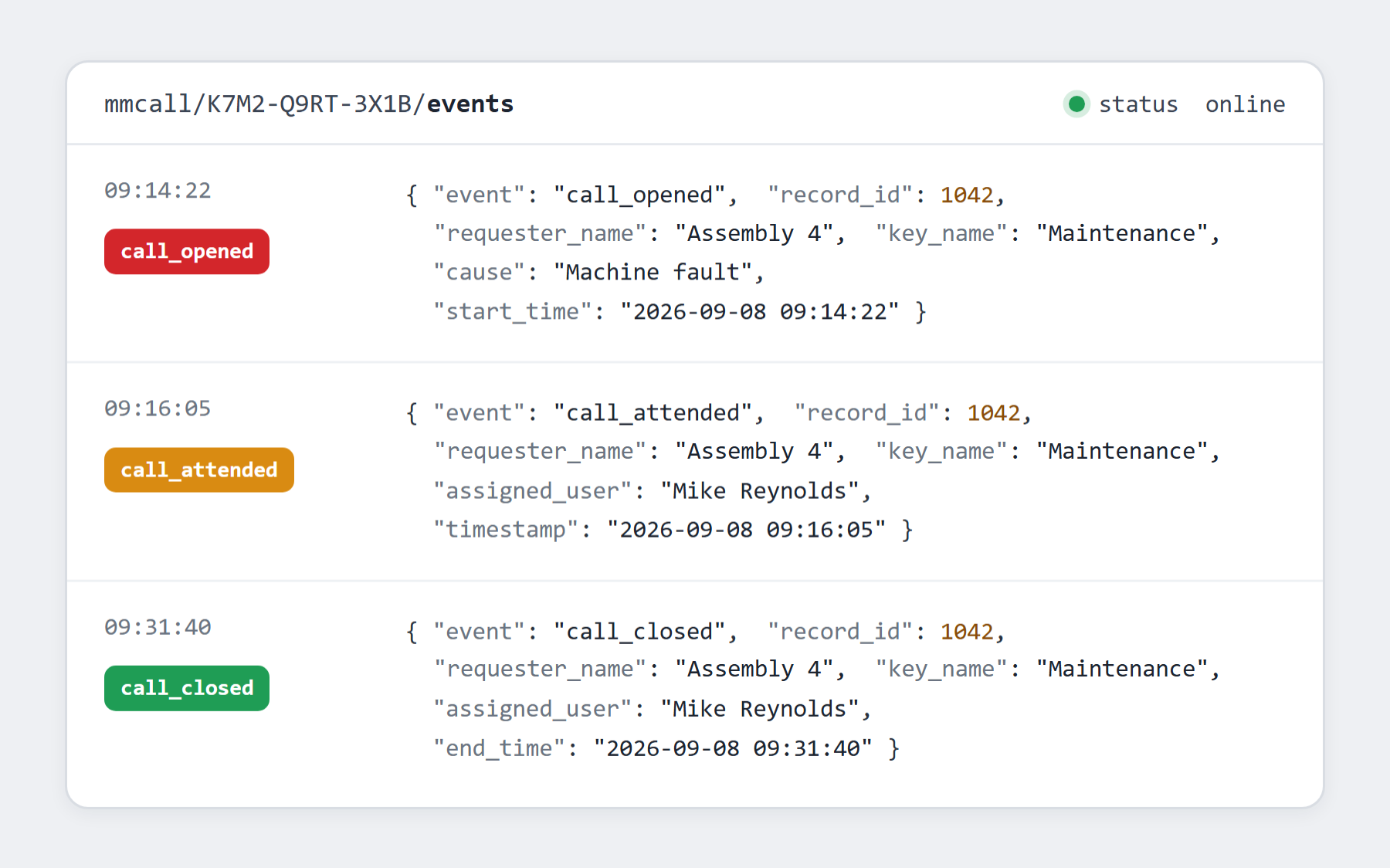
A machine contact or your MES pages the right person, with the same clock and the same escalation as a button press. And every call flows back out to your MES, ERP or dashboards as it opens and closes.
- Every call is published to an MQTT broker on your own network each time it opens, changes or closes.
- Reports download to Excel, Power BI connects directly, and an open HTTP API covers the rest.
Nothing you own today is timing that wait
You already have radios, lights and an MES, and each one does part of the job well. None of them tells you how long your operator actually waited for help, or makes sure the call gets answered at all.
| Radios / two-way |
Stack lights |
MES / OEE |
MMCall wireless andon |
|
|---|---|---|---|---|
| Reaches the right person anywhere on the floor | dead zones | only if watched | not its job | ✓ |
| Times how long help takes (wait + assistance) | ✕ | ✕ | machine only | ✓ |
| Escalates automatically if no one responds | ✕ | ✕ | not its job | ✓ |
| Logs every call for proof & CI reviews | ✕ | ✕ | machine only | ✓ |
| Cuts through high-noise areas | ✕ | visual only | n/a | ✓ |
| Tracks human response time, not just machine state | ✕ | ✕ | not its job | ✓ |
| Keeps working with no Wi-Fi / if the network is down | ✓ | ✓ | ✕ | ✓ |
Your MES isn't the problem here. It was built to watch machines, and it does. The waiting happens in the gap between a person needing help and a person arriving, which is the one thing nothing on that list is measuring.
What’s in the system
Every system needs the transmitter and the license. The buttons and the pagers are how most plants put it together, sized to your floor and your crew. No new server, no cabling contractor, no license to renew.
What most plants start with
recommended
Call buttons at the station
They stick where people stand, so nothing gets wired and nothing gets drilled. Each key calls one team, printed with your plant’s own names and set up before it ships. Press one and it lights up, so the operator knows the call went out.
Specifications
| Radio | 433.500 MHz |
|---|---|
| Range to transmitter | 260 ft clear · plan 100–150 ft |
| Battery | 2 × AAA, up to 10,000 calls |
| Teams per unit | up to 5 |
| Mounting | adhesive, no wiring |
| Enclosure | water resistant |
Reaching the far end of the floor

Past roughly 150 ft, or through enough concrete and racking, a signal repeater sits between the call buttons and the transmitter. Every system ships with at least one, and a big floor chains several. We size them off your layout.
| Range | up to 1/4 mile |
|---|---|
| Chaining | as many as the floor needs |
| Power | wall outlet |

Watch pagers and beepers
The alert lands on the person, not on a wall they have to be looking at. It vibrates silently and the screen names the station and what is needed. A watch for people who will wear one, a clip-on beeper for people who won’t. A charge lasts about a day, so the same watch passes from one shift to the next.
Specifications
| Receives | 462.750 MHz |
|---|---|
| Battery | About 24 hours per charge |
| Recharge | 4 hours · one charger does 5 at once |
| Alert | vibrate + on-screen text |
| Watch | 100% waterproof · 1.5 × 5 × 0.5 in |
| Beeper | water resistant · 1.5 × 2 × 1 in |
The software license
Runs on one PC in your plant. The live board opens in a browser on any TV, monitor or PC you already own, and every call is timed and logged.
Specifications
| Host | one Windows PC runs the software |
|---|---|
| Transmitter | plugs into that same PC by USB, or onto your network by Ethernet |
| Data | stored on that PC |
| Board | any TV or PC on your network, in a browser |

The transmitter
Every press reaches it first, then it drives the watches, the board and the lights. One reaches up to 3/4 of a mile and carries as many call buttons and pagers as you need. You buy it once, and everything you add later costs a fraction of it.
Specifications
| Receives from buttons | 433.500 MHz |
|---|---|
| Transmits to pagers | 462.750 MHz |
| Transmit range | up to 3/4 mile |
| Call buttons | as many as needed |
| Pagers | as many as needed |
| Connection | one USB cable to the PC, or Ethernet to your network |
| Size | 9 × 6.5 × 2.5 in |
Add if you want
optional
Wireless lights
One bulb that changes color with the call type and again as it goes late. No wiring, just a wall outlet.
Specifications
| Triggered by | one or many call buttons |
|---|---|
| Colors | multiple options |
| Power | wall outlet |
| Size | 3.25 × 6 × 1.75 in |

Machine integration
A module that lets the machine raise its own call the moment it faults or stops, without waiting for anyone to notice. No PLC programming.

Virtual buttons
The same call triggered from a computer, tablet or phone, with a custom issue list and a note. For when the right person needs to arrive already knowing what is wrong.

Your plant, from your phone
The call on your lock screen, the Floor Board in your pocket, and Take from anywhere. The same board opens on any computer you sign in from.
About range. Every figure above is line-of-sight, and concrete, racking and metal cut it down. So we size the repeaters from your layout before anything ships, rather than you finding a dead zone later.
A few stations and a few calls cause most of the waiting
Here’s one report from a 27-station plant, shown two ways. Both say the same thing, and it isn’t what anyone there would have guessed.
Every hour in both charts is wait time: somebody standing at a machine before help showed up. You can cut it without fixing anything faster, and your downtime report doesn’t split it out today.
Why people were waiting
% of all waiting timeWhich kind of help was slowest to arrive.
The calls at the top aren’t the most common ones. They’re the ones people waited on longest. That’s about who gets sent, not how fast the work gets done.
Where people were waiting
% of all waiting timeWhich stations lost the most time before anyone came.
The fastest way to cut the wait at those six stations is to get help there sooner: change who covers that end of the floor. Cutting the number of calls takes longer, with a PM schedule change or a spare kept on the shelf.
Your top three won’t be these three. What lands on your list depends on your layout, your shift pattern and who covers what, and none of that shows up until the calls are timed.

Reports you can click into
Pick any range and cut it by station, by shift, by team or by what the call was for, against the period before. Click a number and the calls behind it open. Download it all to Excel.
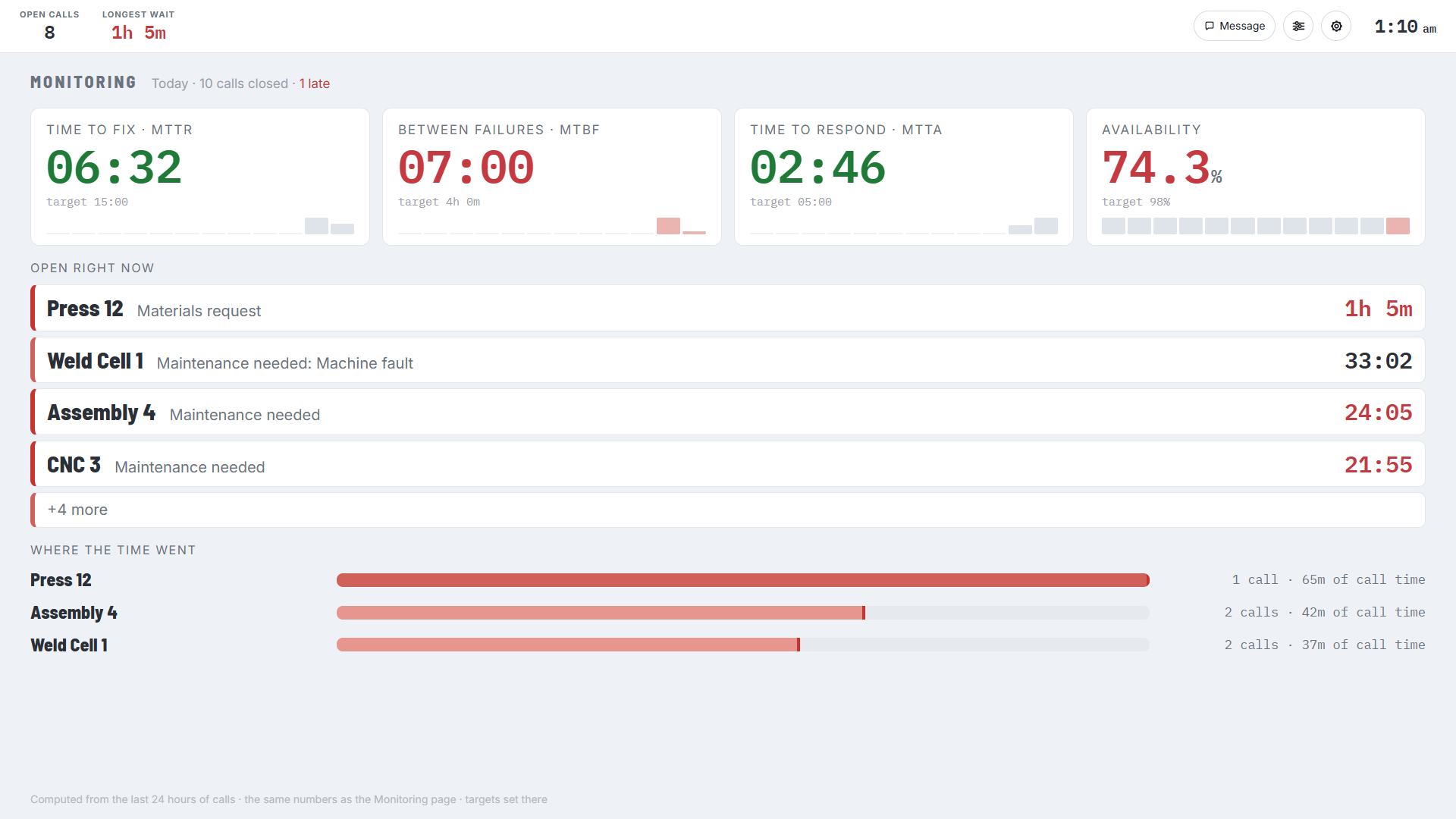
Monitoring, live on the maintenance TV
Time to fix, time between failures, time to respond and availability, each against the target you set, with the calls open right now underneath. The maintenance lead has today’s numbers before anyone asks for them.
This isn’t a scorecard on your crew. It shows how long calls sat before anyone got there, so you can change who covers those stations this month.
Try it in your plant, free for 60 days
You run it live on about ten stations for two months, on your floor, with your own people. We ship the hardware at no cost, and it goes back free if you don’t keep it. The first step is a phone call. The trial is for first-time customers, at plants in the United States.
Agree to it
One call, one document, nothing to prepare
- Whenever you are ready
A 30-minute call about your floor
Which stations, how many of them, and what’s in the way on that floor. A trial is usually about ten stations. That’s the whole call.
- Same week
One trial request to sign
It covers the equipment for the 60 days it’s in your plant. No invoice and no payment details.
Set it up
We configure it, you place it in under an hour
- Before it ships
A short form tells us how your floor works
Machine names, who each call goes to, when it escalates, and where any lights go.
- Before it lands
Your IT puts the software on one PC
One Windows PC of yours runs it. We install it with your IT person in a one-hour remote session. The buttons, watches and lights run on our own radio, not your Wi-Fi.
- The day it lands
It arrives already configured and goes live
Stick the buttons on, hand out the watches, and brief the shift in five minutes.
Let it prove itself
Nothing to do but read it
- 48 hours in
Your own numbers start coming back
Your busiest stations and your longest waits, ranked, from two days of real shifts.
- Day 60
You decide on numbers from your own floor
Keep it at the price you were quoted for what you’ve been running. Or it ships back free, and your floor is the way it was.
That’s phase one. Thirty minutes on the phone, and you’ll know if it fits your floor.
Trusted on 1,000+ plant floors
Tier-1 automotive, aerospace, packaging, chemicals, heavy equipment. Different products, the same problem with people waiting on help. Here are a few of them.






















Real results from real plants
Different industries, same pattern: hidden idle time exposed within the first few shifts, and a wait-time number the plant had never had before.
Hidden Idle Time at a 24/7 Casting Plant
75+ production lines across multiple buildings. Operators used PA systems to call for maintenance, but nobody tracked when help arrived or how long the fix took.
200+ Stations Connected Across 2.1M Sq Ft
Workers walked to find supervisors across a massive facility. No call tracking, no escalation, and no Wi-Fi available for digital tools.
Andon Deployed Across FDA Clean Rooms
Clean room constraints, RF interference concerns, and corporate IT security requirements. Passed formal risk assessment without touching the corporate network.
7 more, same pattern in a different industry:
The questions every plant manager asks first
You will, and it’s two approvals. The trial needs your operations lead, plus IT for the one PC the software sits on. No money moves and there’s no capital request. Buying needs finance and procurement, and that’s the harder one. Do the trial first, and the capital request goes in with sixty days of wait times from your own floor, not a number from us.
The waiting is already happening, and it doesn’t stop for a budget year. The trial costs nothing in any budget year, and it turns “we think we’re losing time” into a number you can put on a request. When you do buy, we can split the payment or take a card if a PO cycle is in the way. And if the whole plant is out of reach this year, start with fewer stations. The transmitter and software in that first system carry every station you add later.
Run us next to whatever else you’re weighing. You can put ours on ten stations for two months before anyone signs anything, so you decide on your own logged response times instead of three sets of vendor claims.
You could get a screen to show a call. The hard part is the call that sits. Ours sends it up the chain on its own. It times the wait separately from the help. And it reaches a watch on its own radio, so it works on a floor where phones aren’t allowed. Put it on a few stations next to yours and compare the numbers.
You reconfigure it yourself. Rename the buttons, move people between teams, change the escalation times, all in the software. The buttons peel off and go back up somewhere else because nothing is wired. No new hardware, no rewiring, no service call, so a layout change costs you an afternoon rather than another purchase order.
Most reviews end at the first answer, which is that the floor doesn't need your Wi-Fi or a server of yours. The radio is ours, on 433 and 462 MHz, the database sits on that one PC, and the one connection out to us can be switched off. An FDA-regulated plant cleared exactly this through a formal corporate IT risk assessment.
The answers IT will ask for
| Network needed | none at all for buttons, pagers and lights |
|---|---|
| Radio | dedicated 433.5 / 462.75 MHz, not Wi-Fi and not Bluetooth |
| If the network goes down | buttons, pagers and lights keep working |
| Cloud | nothing for you to host. The database is local to that PC |
| Host | one Windows PC, Windows only |
| Transmitter | USB to that PC, or Ethernet onto your network, so a virtual host is fine too |
| Traffic into the PC | one listening address on your own LAN: the one a TV or another PC uses to open the board, and the same one your MES or SCADA would call |
| Traffic out of the building | one outbound connection from the host PC, on by default and yours to switch off; it carries online access (the phone, text and email alerts and the call history behind your online reports) and remote support |
You buy it once. No per-user fees, and nothing has to renew.
Three example builds at three sizes. These are examples, not a price for your plant. The only things that change between them are how many stations you cover and how many people carry a watch.
Transmitter, software license, call buttons and watch pagers.
Transmitter, software license, call buttons and watch pagers.
Transmitter, software license, call buttons and watch pagers.
A real system is rarely exactly one of these three. Assistance buttons, floor lights, extra buildings and online access all sit on top.
The transmitter and the software are the bulk of the first system, and you buy them once. That one transmitter already carries as many buttons and pagers as you need, so the next stations are buttons and watches on top of what you already own.
What moves your number
- How many stations. One button per station: every machine, bench or cell where somebody would flag a problem. A line with eight stations takes eight buttons, not one.
- How many people carry a watch. Anyone who responds, so typically maintenance, quality, materials and supervisors.
- Whether you time the assistance too. That adds an Assistance button at the station, so wait time and assistance time show up as two separate numbers.
- How big and how obstructed the floor is. Concrete and metal cut radio range, so a big or spread-out building needs repeaters.
What to weigh it against
Whatever you spend here sits against the hours your people already spend waiting, and that is the one number almost no plant measures today. It's the comparison worth making, and the trial is what settles it.
None of this is a quote, and there’s no way to get one without talking first. One 30-minute call, a written price for the exact system you’d start with, then sixty days running it before you buy.
Get a Quote Sized to Your Floor