
See every room and how long it’s been waiting
Every press calls the next person: the nurse, the doctor, checkout. The room says whose stage it’s on, clock running, until the next press.
Trusted by 650+ practices · 30-day money-back guarantee · 2-year warranty · lifetime support.
Your whole floor on one board
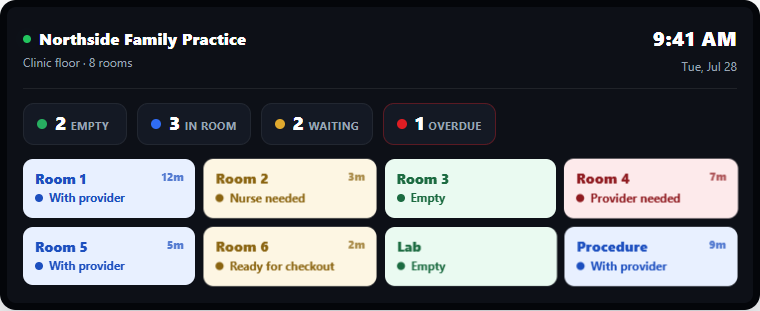
The Room Board shows every room under the name your practice already uses, whose stage it’s on, and how long it has been on it. Below is a morning at a practice, played at speed.

The Room Board, as it ships
One tile per room, in your practice’s words. A key press sets the stage and the tile keeps it, clock running, until the next press or until the desk empties the room. A stage past its limit turns red and says Past limit; the header counts the rooms past limit, the longest wait and the rooms in use. Only staff on shift are paged, so a key pressed at 7 pm reaches the evening team and nobody at home.
The board opens in a browser, so you can open it on as many screens as you want. Not copies of it. The same board, changing on all of them the moment a key is pressed. Put it at the staff station, on the front desk, and in the doctor’s office. Use any TV, monitor, or PC you already own.
Not everybody needs a watch
Every key gets the next person to the room, and you choose where each one lands. Whoever roams wears a watch. Whoever sits at a screen all day, like your front desk, just reads the board, and a room that goes past its limit shows up there too. Most practices buy a handful of watches and run everyone else on screens they already own.
You decide how long is too long
You set how long each stage can run: ten minutes on the nurse, fifteen on the provider, eight on checkout. Past that, the room turns red, says Past limit, and pages again, this time to whoever you choose. The default is your manager, who can go and see what the room is waiting on. Some rooms get no limit at all and never turn red. That’s the setting for the room where a hard conversation is happening. A key can also run a countdown instead of a clock: an eye practice presses Dilating and the lane counts down twenty minutes, then pages on its own when the time is up, and any key can work that way.
Every minute of it is logged
Nobody fills anything in for this. The board is already timing every room, so the week adds up on its own. For most practices it’s the first real record of how long each part of a visit takes.
Nobody walks back down the hall to free a room
The Room Board is also where the desk drives the day. Open it on the desk PC, click any room, and you can set it to any stage or empty it. That last one matters. When a visit ends, everybody who was in the room has moved on, and the person who wants it back is the one checking the patient out.
The key on the wall still frees a room, for whoever turns it over first. It’s just not the only way, and in most practices it won’t be the usual one. And because any room can be set from here, a wrong press or a patient who leaves without checking out takes one click to fix.
Send a message from any computer
Type a note on any PC and send it to a group, like the whole clinical team, to one person by name, or to every Room Board in the office. It shows up on the boards and buzzes their watches, no button needed.
- Same choice as the buttons: send your note to one person, a team, everyone, or the Room Boards on the wall
- Keep medical details out: messages go into your online reports
- Great for a huddle, a quick heads-up, or an all-staff announcement
- Same software as the Room Board, nothing extra to buy
At the end of the week, the day is a number
Every press is stamped, so every stage of a visit has a beginning and an end. Nobody writes anything down and nobody runs a stopwatch. This is what the week looks like when you open it.
Below is a sample week at a six-room family practice. What’s real is the questions it answers. Every one of them comes out of presses your team is already making on the wall.
A typical visit
one patient, one visitThree presses on the wall, each one somebody calling the next person, and one click at the desk to free the room. Nobody did anything they wouldn’t have done anyway. Between them they cut the visit into stages, and every stage is a number.
One patient, from roomed to gone
32 min in the room · 3 stagesEach stage covers both: the waiting and the time somebody spent in the room. The room is only told when a stage ends, because that is what the next press is. It is never told when somebody walked in, so a room showing seventeen minutes may be a long visit rather than a neglected patient. What the report is good for is the shape of your week, not judging one appointment.
Where each room’s day goes
share of an 8-hour day, averaged over the weekEvery visit above, one row per room, averaged across the week.
Read it across and the rooms stop looking alike. In the week above, the provider’s stage runs 1.5 times longer at the far end of the hall. Room 2 is at one end and Room 5 at the other, with the same doctors and the same appointments. A room nobody walks past can be a room nobody gets to. We have no idea whether that is true of yours. This is the chart that would tell you, and nothing had to be measured by hand to draw it.
These two are the shape of it. The Stages table gives every word on your keys its count, average, worst room, limit and how often it was passed; the Press log keeps every press, with a switch that leaves a test press out of the numbers but never out of the log; office hours keep the night out of the averages. Pick a day, a week or a quarter, filter to one room or one kind of press, and download to Excel or CSV for a Monday meeting. The same reports open online.
What’s in the system
The core kit is the same for everyone. Add watches, beepers, or the Room Board on your phones only if you want them.
Every system includes
the 3 core parts
Call Button with 5 Keys
One goes in each room. Sticks on the wall, no wiring. Each key calls the next person and says so on the board: Nurse needed, Ready for checkout. The last one frees the room, for whoever turns it over first, though most practices let the front desk clear rooms at checkout. You label the keys and pick who each one reaches, and a room that needs more can take a second button.
Specifications
| Radio | 433.500 MHz |
|---|---|
| Range to transmitter | about 260 ft clear · plan 100 to 150 ft |
| Battery | 2 × AAA, up to 10,000 presses |
| Keys per unit | 5, each set on its own |
| Mounting | adhesive, no wiring |
| Enclosure | water resistant |
| Size | 4.75 × 2.5 × 0.5 in |

Transmitter
Every button press reaches it first, and it relays each one to the Room Board and the watches. Every system includes one.
Specifications
| Receives from buttons | 433.500 MHz |
|---|---|
| Transmits to wearables | 462.750 MHz |
| Transmit range | about 1/4 mile |
| Call buttons | as many as needed |
| Watches and beepers | as many as needed |
| Connection | one USB cable to the PC |
| Size | 7.75 × 7 × 1.5 in |
MMCall Software
Our software, installed on one main computer, turns any screen in the office into your Room Board: every room, whose stage it’s on, and how long it has been on it. You change what each key says and who it reaches, anytime. Every room’s timing is logged, and you can type a message and send it straight from the software.
Specifications
| Host | one Windows PC you already own |
|---|---|
| Transmitter | plugs into that same PC by USB |
| Data | stored on that PC |
| Room board | any TV, tablet or computer on your network, in a browser |
| Reports | download to Excel or CSV, on the PC or online |
Add if you want
optional
Watch Pager or Beeper
The same alert on the person: a watch on the wrist, or a beeper that clips to a pocket or lanyard. Handy for anyone who steps out of sight of a screen.
Specifications
| Receives | 462.750 MHz |
|---|---|
| Battery | About 24 hours per charge |
| Recharge | 4 hours · one charger does 5 at once |
| Alert | vibrate + on-screen text |
| Watch | 100% waterproof · 1.5 × 5 × 0.5 in |
| Beeper | water resistant · 1.5 × 2 × 1 in |
The Room Board, on a phone
For the manager and the owner, not the clinical floor: the same Room Board, to look at, not to work from. Which rooms are in use, what each is waiting on, and how long it has been sitting, from the front desk, the back office or another location. Past a room’s limit the second page reaches that phone wherever it is, and from any computer you can sign in at mmcallsoftware.com and see the same board and reports. Plain texts and email are still there for anyone who prefers them. Your first 30 days are on us, so you can see whether your staff use it before you pay for it.
Set it up the day it arrives
It ships pre-configured to your rooms. No electrician, no IT project, no server to set up.
1. Unbox it
Every button is already labeled for its room.
2. Install the software
On one Windows PC you already have. That’s your Room Board.
3. Plug in the transmitter
Into that same computer.
4. Place the buttons
Stick one in each room. Peel-and-stick, no wiring.
That’s it. A six-room practice is usually done inside half an hour, and nobody stops seeing patients while you do it.
The questions every office manager asks
Both, and no special screen needed. You buy the wireless hardware: the call buttons and the transmitter. The software is included free. It installs on one Windows PC you already own, and the live Room Board opens on any TV, tablet, or computer you already have.
No. The call buttons are wireless and battery powered. You stick them on the wall and plug the transmitter into a PC. It ships pre-configured to your practice.
A flag only talks to whoever walks past that door. The board tells the whole office at once, from the front desk to the back, and it can page the one person who is actually needed. A flag also can’t tell you it has been up for eleven minutes. The board can, and at the end of the day you can see it in the numbers.
They may not need to. With screens at the front desk, staff station, and back office, staff just glance up to see every room. Many practices run screen-only and add rechargeable watches only for the few people who roam out of sight of a screen.
Every key on the wall is a way of getting somebody to come. Your assistant presses it because she wants a nurse, the nurse presses it because she wants the provider, the assistant presses it because she wants the patient walked out. Nobody is asked to press anything to report where they are or what they’re doing. That’s the press that gets skipped in every system, so it isn’t in this one. The stage on the board and the numbers at the end of the week are a byproduct of people calling each other, which they were doing anyway.
What our customers are saying
“My assistants used to walk the hall looking for whoever they needed next. Now they press a key on the way out of the room and that person gets it. Nobody had to be talked into using it, because it saves them the trip. And I can see every room from the front desk without asking anybody how it’s going.”
“Setup took under an hour, no IT project and no monthly bill, which is exactly what I wanted. My assistants press turnover as soon as a chair is ready, so the next patient goes back sooner. And I’m not walking all four ops to find out which one is waiting on me.”
“Dilating patients were the ones we lost track of. Now the doctor presses the key and the lane shows a countdown, so nobody knocks on that door early and nobody books it out from under her. When the twenty minutes are up it pages the doctor and a tech. Before, she either got walked in on or sat there half an hour because we all assumed somebody else had her.”
“We’re always moving between exam rooms, treatment and the front desk. Someone presses a button, it comes up on a screen we can all see, and whoever’s free takes it. The yelling across the clinic is gone. Rooms get flagged for turnover too, so nobody walks a patient in before the table has been wiped.”
Trusted by 650+ practices
From single-provider offices to multi-site groups, these practices already run on MMCall.
















Easy to start, nothing to lose
Real support and 2-year warranty
Reach people who know the hardware, and every device is covered for 2 years.
30-day money-back
Run it in your practice. If it isn’t a fit, send it back for a full refund.
Unlimited users
Add a key, a room or a new hire whenever you need to. Everyone in the practice sees the same board, and nobody has to be added to a license.
Build and order your system
Set how many of each you need. Every system includes the transmitter and the software with the live Room Board.
System base: transmitter + software
Everything your system runs on. The transmitter connects your call buttons to one office PC, and the MMCall software turns that PC into your live Room Board. Yours to keep for one price, with unlimited users.
Call Button

Watch Pager

Beeper

Multi Charger
Your system
One-time purchase. Includes the software.
What a working system needs
30-day money-back · 2-year warranty